Storm Shield
- 3.0
- Rating
- 100.00K
- Installs
- Free
- Price

 Analysis by App-foxy
If you want a weather app mainly because you are worried about dangerous storms, Storm Shield takes a more focused approach than the usual forecast tools. I found it most useful as an alert companion: something I would check before a commute, an outdoor plan, or a day when severe weather could change quickly. It is a free weather app from Mosaic Srl, aimed at people who want NOAA severe-weather notifications tied to their exact location rather than a broad forecast filled with unrelated details.
That focus is both its appeal and its limitation. You are not choosing it because you want the most polished hourly forecast, the prettiest radar presentation, or a complete replacement for every weather service on your phone. You are choosing it because a timely warning can matter more than a long list of temperatures. My overall impression is that it works best when treated as a safety-focused layer alongside your normal weather app, not as the only source you consult for every weather decision.
What to expect from Storm Shield
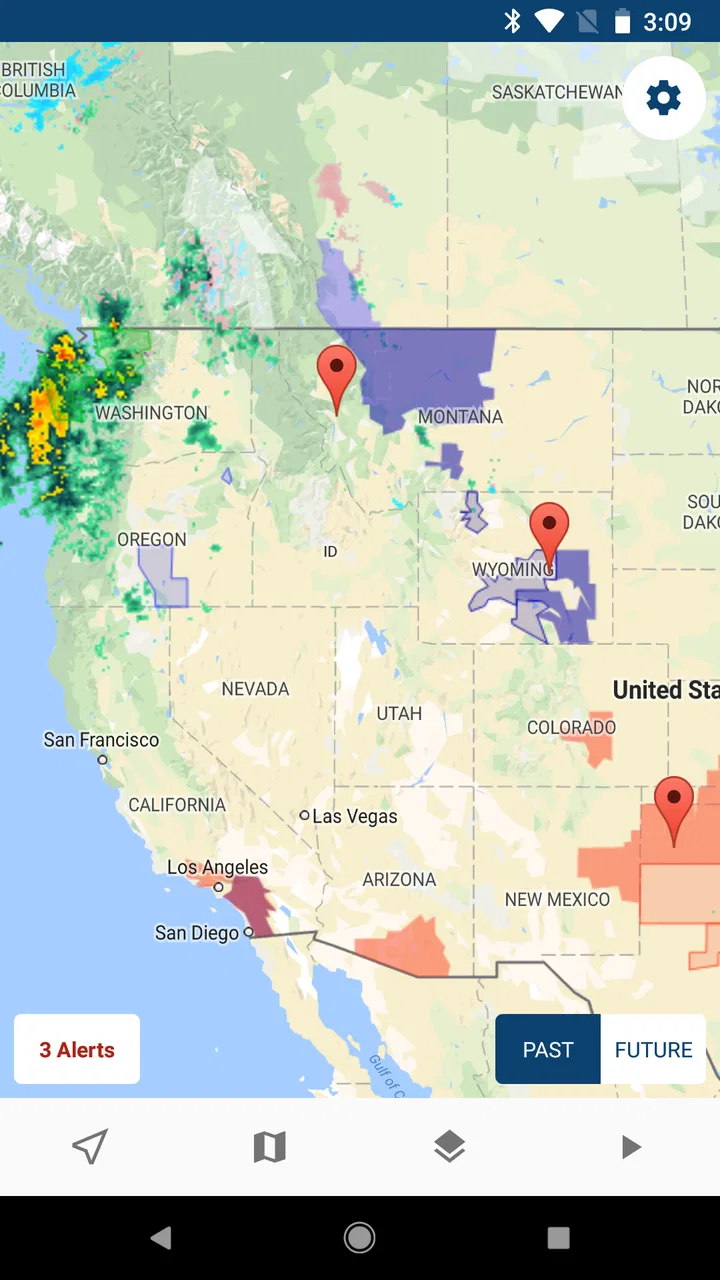
The first thing to understand is the app’s purpose. Storm Shield belongs to the weather category, but its identity is built around severe-weather alerts. The store summary describes NOAA alerts for your exact location, which gives a good idea of the intended experience: the app is meant to help you notice official warnings that apply where you are, rather than making you search through a national map or interpret a general forecast.
You May Also Like

 Blood Strike: 2.5 Anniversary
Blood Strike’s Loadouts Turn Every Drop Into a Tactical Gamble
A close look at Blood Strike’s custom loadouts: how fast access to signature weapons reshapes its battle royale rhythm, rewards preparation, and narrows the gap between fights.

 Pandora - Music & Podcasts
Pandora’s Music Is Easy to Start, but Harder to Recover
Pandora’s strength is its low-effort path from a seed to a station. Its weak spot is how much confidence it asks you to place in connection, setup, and quiet recovery.

 8 Ball Pool
 Is Built on Rivalries, Rematches, and Routine
A close look at the rivalries, rematches, shared routines, and unanswered safety questions that turn a quick pool match into a persistent mobile community.

 Samsung Music
’s Quiet Strength Is Playing What You Already Own
Its reach comes less from spectacle than from dependable access to a personal library. That simplicity is both the app’s strongest retention engine and its ceiling.

 AccuWeather: Weather Radar
AccuWeather Review: A Quick, Clear Forecast for Everyday Decisions
For everyday plans, the best forecast is the one you can understand quickly. AccuWeather makes rain timing, radar, and local conditions easy to act on, with a few trade-offs.

 Hill Climb Racing
Why Hill Climb Racing Still Turns Crashes Into One More Run
A tiny car, a bumpy hill and one more upgrade: Hill Climb Racing keeps resurfacing because its simple chaos makes every near-miss feel personal.
More From Our News Desk
View All News


That location emphasis matters in everyday use. A regular weather app may show a storm icon for an entire city or region, while an alert tool is more useful when you need to know whether a warning affects the place where you actually are. I would particularly consider it for families, commuters, travelers, outdoor workers, and anyone who has to make decisions before a storm arrives.
The app is free to install, with in-app purchases listed at $5.99 per item. That makes it easy to try without committing money at the start, although I would still review any purchase screen carefully before confirming an optional item. It is rated for Everyone, so the basic concept is accessible to a wide audience, including households that want a straightforward warning tool rather than a complicated meteorology dashboard.
Its current version is 5.0.2, and the app requires iOS 9 or later. Those details are especially relevant if you are installing it on an older iPhone or iPad. On a newer device, the more important question is not whether it can replace your existing forecast app, but whether you will allow it to become part of your emergency routine. An alert app only earns its place when its notifications are noticed and acted on.
The public response is mixed rather than universally enthusiastic. Storm Shield has an average rating of 3.2 from around 3.5 thousand ratings, with roughly 1.7 thousand written reviews and over 100 thousand installs. I read that as a reason to set realistic expectations: there is a real audience for the concept, but the experience may not feel equally smooth for every user or every location.
Who will get the most value
I would recommend trying it if your main question is, “Could severe weather affect the place I am in?” That is a different question from “What will the temperature be this afternoon?” If you live in an area where thunderstorms, tornadoes, hurricanes, or other serious weather events are a regular concern, an alert-first app can provide a useful second line of awareness.
It can also help if you care for children or relatives and need a simple way to stay aware while moving between home, work, school, or another regular destination. The exact-location idea is more practical than relying on memory of county boundaries or assuming that a warning for a nearby town applies equally to you. I still would not use any single phone app as my complete emergency plan, but I can see this fitting naturally into one.
On the other hand, I would skip it as a primary choice if your priority is detailed daily forecasting. Someone who wants pollen information, a long-range outlook, minute-by-minute rain timing, rich radar controls, or a highly visual weather map may be happier with a broader weather service. Storm Shield’s value comes from narrowing the problem, not from trying to win every weather category at once.
Setting it up without overthinking the first screen
For a first-time user, the most important setup decision is the location. The app needs to know which place should receive relevant alerts, so I would begin by choosing the location you actually want protected rather than automatically assuming that your current position is always the right one. If you are testing it at home but spend most weekdays elsewhere, think about which location matters during the hours when you are most exposed.
This is one of the less obvious trade-offs of location-based alerts. A phone that moves with you can be useful because the warning follows your circumstances, but it can also create confusion if you expected a fixed home location. Before relying on the app, I would deliberately check what place it is using and whether that matches the situation I care about. A warning system is only helpful when its geographic context is clear.
I would also avoid treating the first launch as the end of setup. After opening the app, spend a moment learning where the current location and alert information are displayed. You do not need to become a weather expert, but you should know how to tell the difference between a general weather update and a serious warning that deserves action. That small familiarization step is more valuable than simply installing the app and forgetting it.
Notification behavior deserves practical attention. If your phone silences unfamiliar apps, groups notifications, or uses a focus mode that hides alerts, the app may not serve its purpose when you need it. I would check the system’s notification settings after installation and make sure the app is not being treated like a low-priority shopping or social application. I would also check the settings again after a major phone update, because notification habits can change without being obvious.
There is a useful distinction here between permission and trust. Giving a weather app access to a location can make alerts more relevant, but you should understand whether you prefer a moving location or a selected place. If you are uncomfortable with continuous location use, a fixed location may suit your routine better, provided the app offers that choice in your version. The practical goal is not to grant every permission automatically; it is to configure the app so the alerts match your real life.
Because the app is free with optional purchases, I would also take the time to identify which parts are available immediately and which may be connected to an in-app purchase. The listed price is $5.99 per item, so a cautious first session should include checking what you are being offered before tapping a confirmation button. This is not a reason to avoid the app, but it is a good habit for any free download with optional paid content.
Your first meaningful success
The first successful action should be simple: confirm that the app is watching the correct place and that you understand how a severe-weather alert appears. Do not wait for a real storm to discover that your location is wrong or your notifications are hidden. Open the app on a normal day, inspect the location shown, and make sure you can recognize the alert area when it appears.
After that, build a small routine around it. Before leaving for a long drive, check whether any warning applies to the route’s starting area. Before sending children to an outdoor activity, look at the alert status rather than relying only on a morning forecast. If you work outside, make the check part of your normal preparation. These uses are more realistic than opening the app repeatedly throughout the day without a specific question in mind.
A scenario I found convincing is a family preparing for a weekend event. One person can check the ordinary forecast for temperature and rain, while another uses Storm Shield to focus on serious warnings for the current location. If a warning appears, the family can decide whether to delay, move indoors, or follow local instructions. The app does not make that decision for you, but it can reduce the chance that a serious alert is buried among ordinary forecast information.
Another useful workflow is to keep a general weather app for planning and use this one for interruption. The general app answers questions such as whether you need a jacket or umbrella. Storm Shield is more relevant when the question becomes whether the plan needs to stop or change because of dangerous conditions. Separating those jobs makes the app easier to understand and prevents disappointment when it does not behave like a full forecast suite.
When an alert arrives, read it carefully instead of reacting only to the sound or headline. Pay attention to the affected area, the type of warning, and the instructions from local authorities. A phone alert is a prompt to evaluate the situation, not a substitute for official emergency guidance. If you are indoors, know where you would go for shelter before a warning happens. If you are driving, do not interact with the phone while moving; pull over safely or have a passenger check it.
The best first result is not merely receiving a notification; it is knowing exactly what you will do after receiving one. That is where Storm Shield becomes more than another icon on the home screen. Its usefulness depends on connecting the warning to a prepared action, whether that means moving indoors, contacting family, changing a route, or checking local emergency instructions.
Where new users can become confused
The biggest possible misunderstanding is expecting every kind of weather information to appear with equal depth. Storm Shield’s severe-weather focus means it should not be judged solely by the standards of a general forecast app. If you open it looking for a complete picture of the next ten days, you may feel that it is too narrow. If you open it to monitor serious warnings for a particular location, its purpose is much clearer.
Exact location can also be misunderstood. “Your location” does not necessarily mean that every warning is personalized to your front door or that the app can predict conditions for one street. Weather warnings are issued for defined areas, and the app’s value is helping connect those official alerts with the place you are using. I would still read the geographic coverage of each warning instead of assuming that being just outside a displayed area means conditions are harmless.
Another point of confusion is the difference between an alert and a forecast. A quiet alert screen does not mean the day is guaranteed to be safe, and a storm icon in another weather app does not automatically mean an official severe-weather warning is active. These tools answer different questions. I prefer to combine them: use a normal forecast to plan, then use the alert app to watch for conditions serious enough to change that plan.
Some users may also wonder why they should keep a dedicated alert app when their phone already includes a weather widget. The answer depends on how much attention the built-in tool gives to severe-weather notifications and whether you trust yourself to notice them. A widget is convenient for glanceable conditions, but a focused app can be worthwhile when your priority is not missing a warning. The trade-off is another app to configure and maintain.
The mixed rating suggests that reliability and usability may not feel identical for everyone. Location, notification settings, device age, and expectations can all affect the experience. I would test it during ordinary weather, confirm that the displayed location makes sense, and avoid uninstalling your other weather tools until you know how well this one fits your routine. That short trial period is a sensible safeguard, especially if severe-weather awareness is important to you.
I would also avoid assuming that an alert means the app itself has complete authority. NOAA alerts are important, but local emergency management, weather radio, public safety announcements, and instructions from authorities remain valuable sources. Storm Shield can help put a warning in front of you; it cannot inspect your building, judge road conditions, or tell you which shelter is safest in your specific circumstances.
How it compares with ordinary weather alternatives
Compared with a standard weather app, Storm Shield is more specialized and potentially less cluttered for its central job. A normal weather app usually wins when you want a quick temperature check, hourly planning, or a visual look at changing conditions. Storm Shield makes more sense when the cost of missing a serious warning feels higher than the convenience of having every forecast feature in one place.
Compared with checking a weather website manually, the app has the advantage of being part of your phone routine. You do not have to remember to open a browser every time conditions become uncertain. That convenience is meaningful, but only if notifications are configured correctly and you pay attention to them. An app that is installed but muted is less useful than a website you actively check before a risky activity.
Compared with government or local emergency channels, Storm Shield can be more convenient for a personal device, while official channels may provide broader instructions and community-specific information. I would not frame the choice as one or the other. The strongest setup is layered: a focused alert app for immediate awareness, a regular forecast source for planning, and official local guidance for decisions during an actual emergency.
Compared with a feature-heavy radar application, this app may be easier for a person who does not want to interpret radar colors, storm tracks, or technical weather layers. That simplicity can be a strength for a parent, older relative, or casual user. The downside is that someone who enjoys following storm development may find it too limited. In that case, a radar-focused tool is probably the better companion, while Storm Shield can still serve as an alert backup.
Practical habits that make the app more useful
First, choose a location based on your routine, not just the place where you happen to install the app. If your day moves between home and work, decide which location deserves priority and check the app before traveling. This avoids the common mistake of assuming that one static setting automatically covers every place you visit.
Second, make a notification check part of your setup rather than waiting for a warning. Confirm that the app is allowed to notify you, then make sure your phone’s broader modes are not suppressing it. I would especially check this before a trip, camping weekend, outdoor shift, or severe-weather season. The goal is to remove technical uncertainty before the alert matters.
Third, pair the app with a simple household plan. Decide where everyone goes during dangerous weather, how you will contact one another, and who will check on people who may not see the notification. This turns an alert into a useful trigger instead of a moment of panic. It is a small step, but it is the kind of practical preparation that a weather app alone cannot provide.
Fourth, do not use a silent day as proof that nothing can happen. Alerts are event-driven, while forecasts describe possibilities. Keep using your normal judgment and check official information when conditions look threatening. Storm Shield is strongest as an extra layer of awareness, not as permission to ignore dark skies, local instructions, or changing road conditions.
Finally, review any optional purchase before accepting it. The app costs nothing to download, but in-app purchases are listed at $5.99 per item. If you only need the basic alert experience, understand what you are receiving before spending money. If an optional feature genuinely improves your routine, the decision becomes easier because you are paying for a specific need rather than buying blindly.
My recommendation after using it
I see Storm Shield as a focused tool for people who want severe-weather awareness tied to a particular location. Its strongest quality is its clear purpose: it is not trying to be an endless weather encyclopedia. For a first-time user, the path to value is straightforward—install it, set the right location, verify notifications, learn how alerts are presented, and connect warnings to a household or travel plan.
I would recommend giving it a try if you live in a storm-prone area, spend time outdoors, care for others, or simply want a dedicated warning layer beside your everyday forecast app. The free entry point makes that trial relatively easy, and the Everyone rating keeps the concept approachable. Mosaic Srl has built something that can be useful when the main question is whether a serious warning affects where you are.
I would not recommend relying on it alone if you need detailed forecasting, sophisticated radar analysis, or comprehensive local emergency instructions. A broader weather service will be better for daily planning, while official public-safety sources remain essential during dangerous conditions. The app’s average rating of 3.2 also encourages a measured approach: test it on your own device and in your own routine before treating it as indispensable.
My final view is positive but practical. Storm Shield is most valuable when it fills a specific gap rather than replacing everything else. Set it up before you need it, check the location deliberately, keep notifications visible, and decide in advance what action an alert should trigger. Used that way, it can become a reassuring part of a weather-safety routine without pretending to be the only weather information you will ever need.
FAQs for Storm Shield
01What features does Storm Shield offer for severe weather alerts?
Storm Shield provides users with real-time severe weather alerts, including tornado, hurricane, and flood warnings. The app offers customizable notifications based on your location and preferences, ensuring that you receive timely updates. Additionally, it includes detailed radar maps and weather forecasts to help you stay informed and safe.
02Is Storm Shield available on both Android and iOS platforms?
Yes, Storm Shield is available for download on both Android and iOS devices. You can find it on the Google Play Store for Android users and the Apple App Store for iOS users. The app is designed to work seamlessly across both platforms, offering a consistent user experience.
03How accurate are the weather alerts provided by Storm Shield?
Storm Shield uses data from the National Weather Service to provide highly accurate and reliable weather alerts. The app is designed to deliver real-time notifications, ensuring you receive the most up-to-date information. While no app can guarantee 100% accuracy, Storm Shield is trusted by many for its precision and timeliness.
04Does Storm Shield offer any premium features or is it free to use?
Storm Shield is free to download and use; however, it does offer some premium features through in-app purchases. These may include additional alert customization options, ad-free experience, and advanced radar features. Users can choose to access these features by subscribing to the premium version for enhanced functionality.
05Can Storm Shield be used internationally, or is it limited to specific regions?
Storm Shield primarily focuses on providing weather alerts within the United States, as it sources data from the National Weather Service. While it may offer basic weather information for international locations, the app's alert system is specifically tailored for U.S. residents. Users outside the U.S. may not receive the same level of detailed alerts.
Pros
- Accurate weather alerts for severe conditions.
- Customizable notification settings.
- User-friendly interface design.
- Covers multiple locations simultaneously.
- Real-time radar and storm tracking.
Cons
- Limited features in the free version.
- Occasional delays in alert notifications.
- Heavy on battery usage over time.
- Some ads in the free version.
- Requires stable internet connection.

Storm Shield
Gallery